Stop Working in External Communication Tools
Stop Working in External Communication Tools
Keep your business data secure and accessible. Structo’s In-App Chat isn't just for text—it lets you share live Clients, Properties, and Files that link directly to your database, ensuring you never lose context.
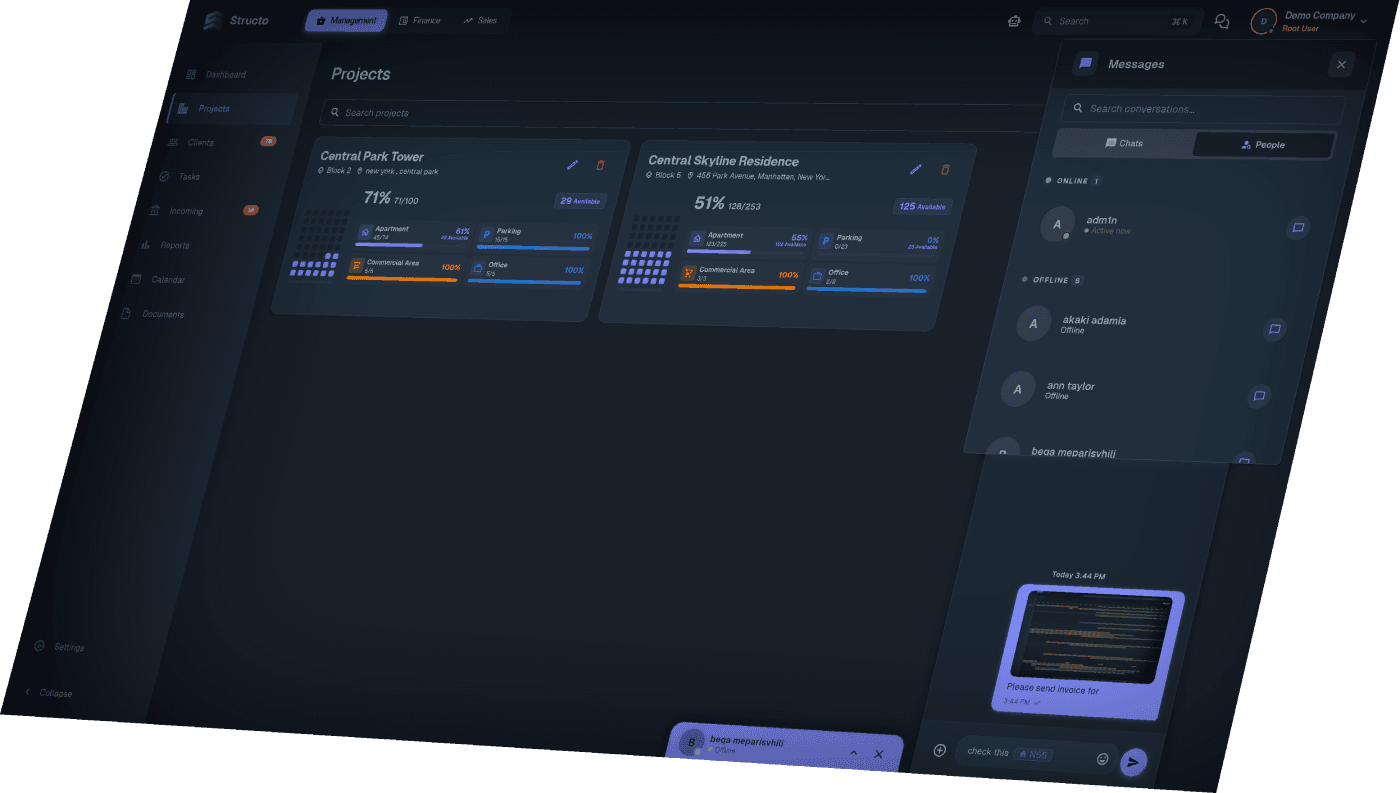
Active Data, Not Just Text.
Standard messengers don't understand your business. Structo does. When you share information in the chat, it creates a live bridge to your database.
Instant Navigation: Don't type "Apartment 101." Use the Add Property button. When the recipient clicks the link, the system automatically opens that Property's full dashboard.
Client Profiles: Share a client card via Add Client. Your manager can click it to instantly view the client's deal history and contact info without searching.
Active Data, Not Just Text.
Standard messengers don't understand your business. Structo does. When you share information in the chat, it creates a live bridge to your database.
Instant Navigation: Don't type "Apartment 101." Use the Add Property button. When the recipient clicks the link, the system automatically opens that Property's full dashboard.
Client Profiles: Share a client card via Add Client. Your manager can click it to instantly view the client's deal history and contact info without searching.
Active Data, Not Just Text.
Standard messengers don't understand your business. Structo does. When you share information in the chat, it creates a live bridge to your database.
Instant Navigation: Don't type "Apartment 101." Use the Add Property button. When the recipient clicks the link, the system automatically opens that Property's full dashboard.
Client Profiles: Share a client card via Add Client. Your manager can click it to instantly view the client's deal history and contact info without searching.
Screenshots & Files in One Click.
Speed up your internal workflow with tools designed for support and operations.
Native Screenshot Tool: No need for external snipping apps. Capture and share your screen directly from the chat menu to explain issues faster.
Secure File Sharing: Upload contracts, floor plans, and spreadsheets directly into the conversation. Files stay within the company ecosystem, not on personal devices.
Screenshots & Files in One Click.
Speed up your internal workflow with tools designed for support and operations.
Native Screenshot Tool: No need for external snipping apps. Capture and share your screen directly from the chat menu to explain issues faster.
Secure File Sharing: Upload contracts, floor plans, and spreadsheets directly into the conversation. Files stay within the company ecosystem, not on personal devices.
Screenshots & Files in One Click.
Speed up your internal workflow with tools designed for support and operations.
Native Screenshot Tool: No need for external snipping apps. Capture and share your screen directly from the chat menu to explain issues faster.
Secure File Sharing: Upload contracts, floor plans, and spreadsheets directly into the conversation. Files stay within the company ecosystem, not on personal devices.
Know Who’s Ready to Help.
Access your entire organization without needing to save phone numbers.
Live Availability: Instantly see who is Online (Green indicator) or Offline to know when to expect a reply.
Unified Search: Quickly find past conversations, specific team members, or shared files using the global search bar.
Know Who’s Ready to Help.
Access your entire organization without needing to save phone numbers.
Live Availability: Instantly see who is Online (Green indicator) or Offline to know when to expect a reply.
Unified Search: Quickly find past conversations, specific team members, or shared files using the global search bar.
Know Who’s Ready to Help.
Access your entire organization without needing to save phone numbers.
Live Availability: Instantly see who is Online (Green indicator) or Offline to know when to expect a reply.
Unified Search: Quickly find past conversations, specific team members, or shared files using the global search bar.
Smart Linking
Clicking a shared Property or Client instantly opens their specific page.
Smart Linking
Clicking a shared Property or Client instantly opens their specific page.
Smart Linking
Clicking a shared Property or Client instantly opens their specific page.
Screenshot Tool
Built-in functionality to capture and send screen snippets instantly.
Screenshot Tool
Built-in functionality to capture and send screen snippets instantly.
Screenshot Tool
Built-in functionality to capture and send screen snippets instantly.
Real-Time Status
Real-time Online/Offline visibility for all employees.
Real-Time Status
Real-time Online/Offline visibility for all employees.
Real-Time Status
Real-time Online/Offline visibility for all employees.
Data Security
Chat history stays with the company server, not on personal phones.
Data Security
Chat history stays with the company server, not on personal phones.
Data Security
Chat history stays with the company server, not on personal phones.
File Sharing
Upload and send documents directly in the chat window.
File Sharing
Upload and send documents directly in the chat window.
File Sharing
Upload and send documents directly in the chat window.
Centralized History
Searchable archive of all internal communications.
Centralized History
Searchable archive of all internal communications.
Centralized History
Searchable archive of all internal communications.
Use Cases
Sales Agent
"I need a discount approval. I will click Add Property to send the unit link to the Director, so he can open it and see the pricing instantly."
IT Support
"The user has an error. I will ask them to use the Take Screenshot tool to show me exactly what is happening on their screen."
HR Manager
"I need to find a message from last month. I will use the Search function in the message list to locate the file."